Sprout Mobile Apps
While the Web UI and PWA offer great flexibility, we also provide a native mobile experience for deeper OS integration, including push notifications and home screen widgets.
Android
We offer a native Android application built with Flutter to provide a smooth, integrated mobile experience for Sprout users.
Installation Methods
Manual Installation (Sideload APK)
If you prefer to avoid app stores entirely or want to test independent builds, you can download the latest compiled production APKs directly from the GitHub Releases page.
Home Screen Widgets
The Android app includes native home screen widgets designed to keep you updated on your financial status at a glance.
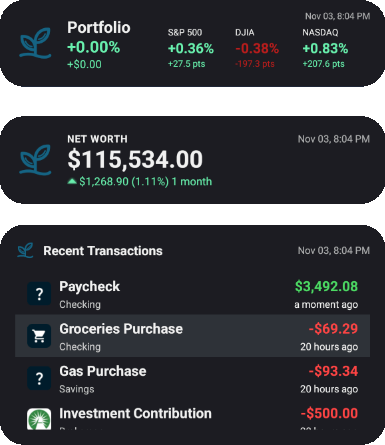
- Overview Widget: Displays a quick snapshot of your current net worth, including recent numerical and percentage changes.
- Transactions Widget: Shows a scrolling list of your most recent transactions, displaying the merchant, category, amount, and pending status.
- Portfolio Widget: Shows your portfolio's daily percentage and dollar change alongside the S&P 500, DJIA, and NASDAQ daily percentage and point changes.
Widget Requirements
- Background Updates: Widgets automatically refresh roughly every 30 minutes to keep your data fresh without impacting battery life.
- Configuration Required: To see widget support on your home screen, you must explicitly enable the widget permissions under your User Settings inside the app.
iOS
At this time, we do not offer a native iOS application on the Apple App Store. We hope to expand the Flutter codebase to iOS devices in a future development cycle.
Recommended Setup for Apple Users
In the meantime, you can achieve a nearly identical native app experience by installing Sprout as a Progressive Web App (PWA):
- Open your Sprout Web UI instance inside Safari on your iPhone or iPad.
- Tap the Share button in the browser toolbar.
- Scroll down and select Add to Home Screen.
For more information, see the PWA Setup Guide.